
Microsoft are retiring their desktop publishing software, Microsoft Publisher, from the 1st October 2026. Users of the Microsoft 365 Apps will no longer be able to access Publisher after that date, and you’ll no longer be able to view or edit Publisher files.
If your organisation still uses Microsoft Publisher to create brochures, newsletters, flyers, menus, certificates, signage or other marketing materials, you’ll need to act before 1st October 2026.
To support organisations in preparing for this change, we have produced this short guide.
Why is Microsoft retiring Microsoft Publisher?
According to guidance from Microsoft, Microsoft Publisher is harder to defend against security vulnerabilities and blocking the application will help reduce future security risk and match their future strategy.
What should you do?
We recommend reviewing your shared folders and document libraries now to identify any Publisher files that are still being used. This gives you time to convert important documents and replace any templates your teams rely on before Publisher is removed.
You should take action to save any Microsoft Publisher (.pub) files in an alternative format ahead of the retirement date on 1st October 2026.
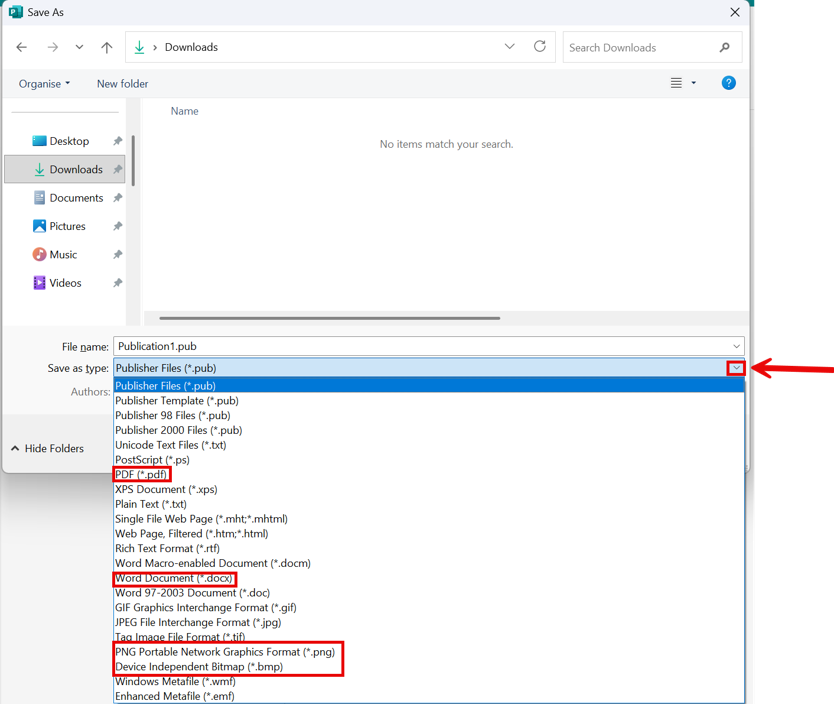
You can re-save your existing Microsoft Publisher files in a variety of alternative formats, including PDF, images and Microsoft Word documents.
To resave your documents:
- Open your existing Microsoft Publisher (.pub) file,
- Open the File menu
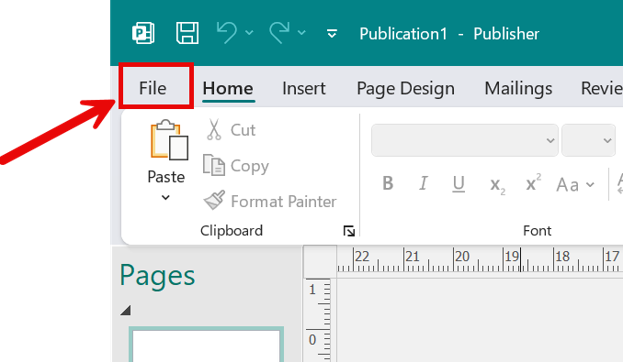
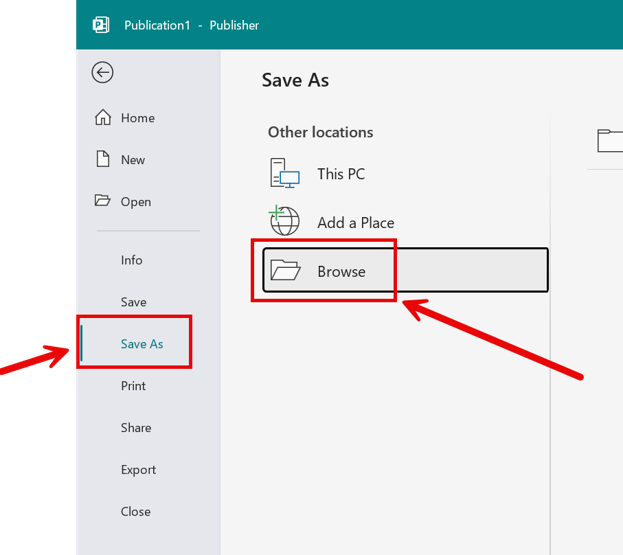
3. Select Save as from the menu and choose Browse
4. Open the Save as type drop-down menu and select your desired format. If you’re unsure, we recommend saving as PDF, Word or an Image format (e.g. .png)
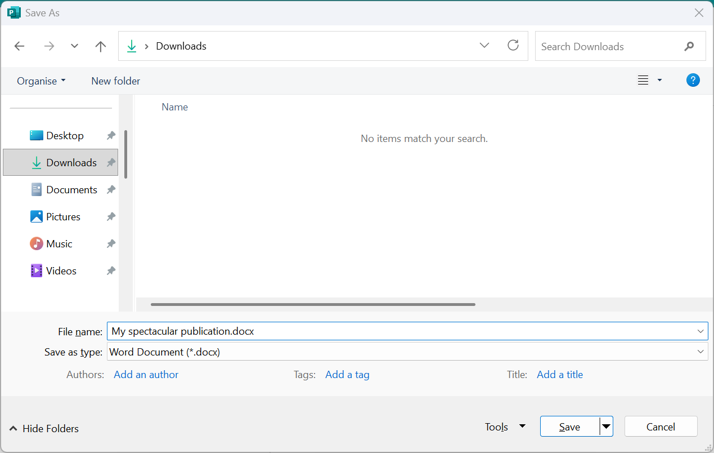
5. Save the document in your preferred location and give it a name
What happens if you do nothing?
If you don’t convert your Publisher files before the retirement date, you could find that:
- You can no longer edit important business documents.
- Historic .pub files become inaccessible through Microsoft 365 Apps.
- Teams lose access to templates they use regularly.
- Business processes that rely on Publisher need to be recreated at short notice.
Acting now helps avoid disruption and ensures important documents remain accessible.
What are the alternatives?
There are other options within the Microsoft 365 Apps suite for simple desktop publishing, including Word and PowerPoint. You can also leverage the power of Microsoft 365 Copilot Create – an AI-powered design tool for documents https://m365.cloud.microsoft/create, allowing you to quickly create posters and infographics from your description.
If you have more complex needs, check out Adobe InDesign, part of the Adobe Creative Cloud suite. InDesign is the industry standard desktop publishing software and includes many powerful features not found in Microsoft Publisher, and allows you to handle complex multi-page publications.
Need help preparing for Microsoft’s changes?
Microsoft Publisher is just one of many applications evolving within Microsoft 365. Our experienced team of IT, technology, and cyber security specialists can help you plan, minimise disruption and ensure your team have the right tools before changes take effect.
If your organisation uses desktop publishing, we can also help you migrate to and implement Adobe Creative Cloud, including applications such as Adobe InDesign, Illustrator and Photoshop.
Please get in touch with us today to see how we can help your organisation.